
Link GA4 property
Connect your Google Analytics 4 (GA4) data to SEO Gets with a pre-filtered view of your organic search performance—without the noise of paid campaigns, social traffic, and direct visits.
The connection is read-only, so SEO Gets can view your data but never modify your GA4 properties.
Link a GA4 property to your site
Sign into SEO Gets
Select a site → Settings
Scroll down to the Data Source section
Under Google Analytics 4, click Select GA4 Property
Choose the property from the dropdown list

Once connected, you'll see all your GA4 properties alongside your Search Console data in one place.
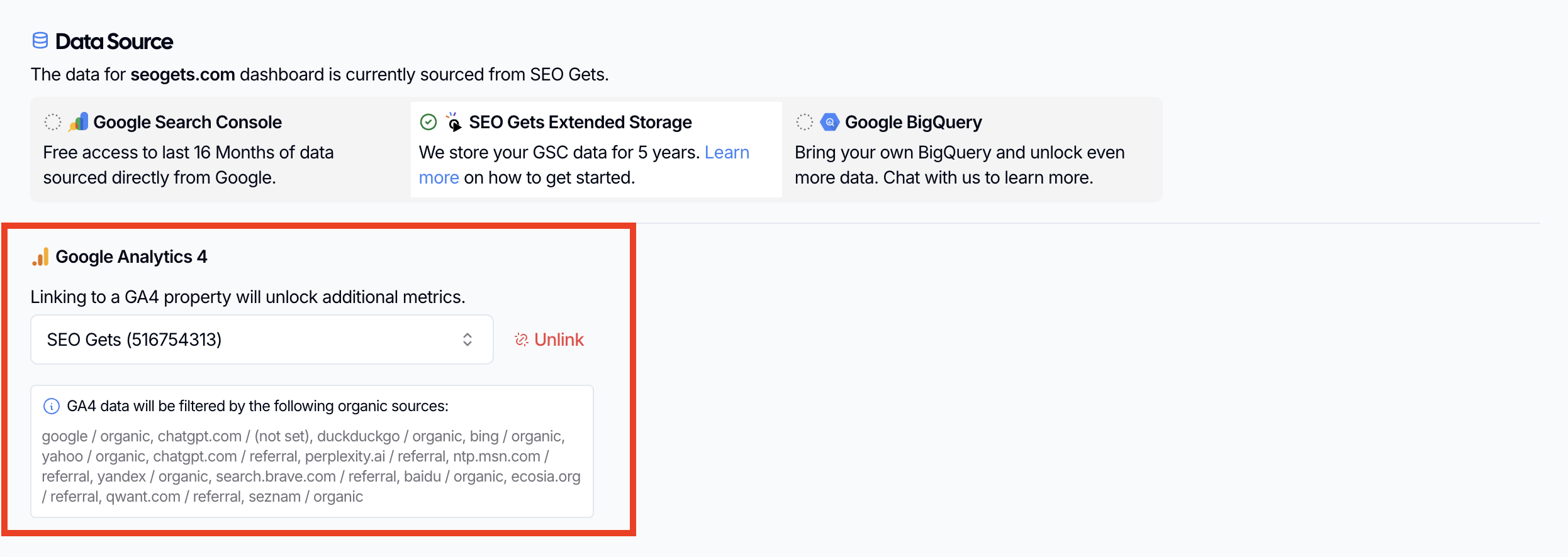
GA4 data will be filtered by the following organic sources:
google / organic, chatgpt.com / (not set), duckduckgo / organic, bing / organic, yahoo / organic, chatgpt.com / referral, perplexity.ai / referral, ntp.msn.com / referral, yandex / organic, search.brave.com / referral, baidu / organic, ecosia.org / referral, qwant.com / referral, seznam / organic
Choosing the right property
If you have multiple GA4 properties, look for the one that matches your site. The dropdown shows each property as:
Property Name (ID)
For example: My Website (123456789)
Select the property that corresponds to the site you're configuring in SEO Gets.
If you're not sure which property to pick, open GA4 directly and check which property you use for that site. Then come back and select the matching one.
Troubleshooting
No properties appear in the dropdown
If the dropdown shows No properties found, check:
Google account connected — Go to Settings → My Google Accounts and confirm the right Google account is connected. The account needs access to the GA4 property you want to link.
Property access — Make sure your connected Google account has access to the GA4 property in Google Analytics. If you recently gained access, try reconnecting the account.
Multiple linked accounts — If you use several Google accounts, verify which one is actually connected to your SEO Gets team. The property you're looking for may belong to a different account than the one currently linked.
"Currently linked to a property you don't have access"
This message appears when a property was previously linked, but your connected Google account no longer has access to it. This can happen if:
The property was moved to a different Google account
Your access was revoked
You're now signed in with a different Google account
To fix it, reconnect the correct Google account in Settings → My Google Accounts, then select the right property.
Can't find a property you know exists
If you are sure your Google account has access to a GA4 property but it isn't showing up under the name you expect, check the exact property name in Google Analytics. SEO Gets lists properties by their GA4 name and ID, which may differ from your domain or brand name.
Open Google Analytics and find the property.
Note the exact Property name and 9-digit Property ID.
Return to SEO Gets and look for that exact name or property ID in the Select GA4 Property dropdown.
GA4 is linked but you can't see it
If a teammate linked the GA4 property and you still cannot see it, the issue is usually team access rather than the GA4 connection itself.
Team role — Contributors cannot see all connected data. Ask your team owner to upgrade your role to Team Member or Admin.
Wrong Google account on the team — The GA4 property is tied to the Google account that is actually connected to your SEO Gets team. If your teammate linked the property from a different Google account, make sure that account is connected to your team and that you have access as a team member.
GA4 panel shows "Connect GA4" or stays empty
If your GA4 dashboard widgets show prompts like "Connect GA4 to this property to view sessions" or appear blank:
Not linked yet — Complete the setup steps above to link a property.
Still loading — Wait a few moments for the data to sync. GA4 data can take a moment to appear after linking.
Access issue — If you see the "don't have access" message above, follow those steps.
Property has no matching data yet — GA4 reports require at least one session from an organic or filtered referral source. If your site has no organic traffic in the date range, the panel will be empty.
For data mismatches between SEO Gets and GA4, see Why doesn't my GA4 data match what I'm seeing in SEO Gets?
Related articles
GA4 analytics in SEO Gets — What metrics you'll see and how to work with them
Why doesn't my GA4 data match what I'm seeing in SEO Gets? — Troubleshooting data differences
Unlink GA4 property — How to remove a linked property
Connect your Google account — Account-level connection and permissions