
Why doesn't my GA4 data match what I'm seeing in SEO Gets?
If your GA4 numbers look different from what you see in SEO Gets, don't worry—this is expected. SEO Gets filters your GA4 data to show only organic search traffic and specific referral sources, which means your data in SEO Gets will differ fro your default data in GA4.
SEO Gets filters out (not set) sources as this represents poor quality data and sessions.
The short answer
SEO Gets pulls from a Landing Page report in GA4 and applies a filter for session source/medium. We only show traffic from organic search engines and a specific set of AI/referral sources that we've identified as meaningful for SEO analysis.
That means:
SEO Gets shows you filtered traffic—organic search plus select referrals
GA4 (by default) shows you all traffic to your site
So if you're looking at total sessions in GA4 and comparing them to SEO Gets, the numbers won't match because GA4 includes direct traffic, paid campaigns, social media, email, and other sources we intentionally filter out.
What we filter for
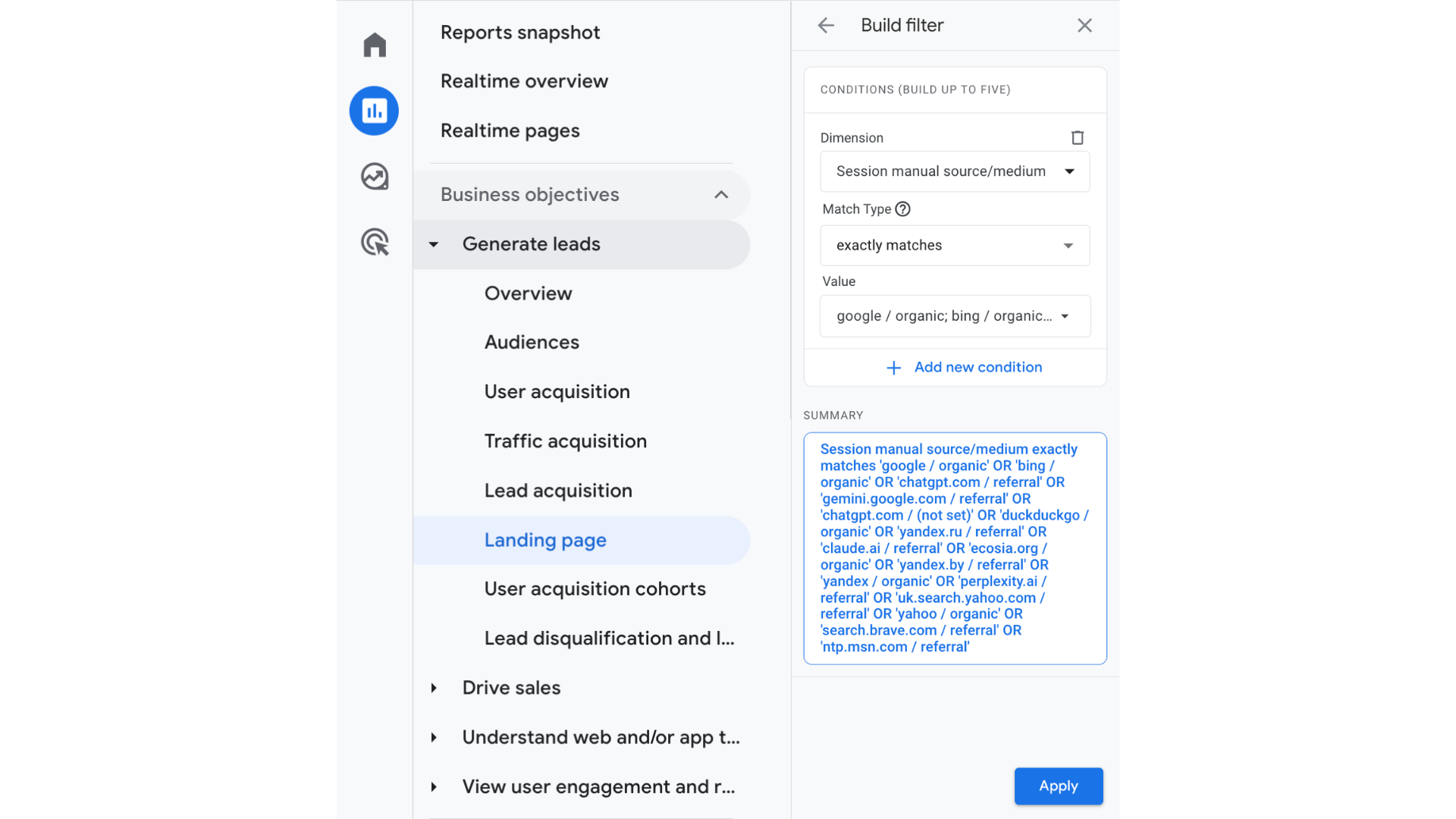
SEO Gets pulls GA4 data using this filter:
Report: Landing Page
Filter: Session source/medium exactly matches one of the following:
google / organicbing / organicyandex / organicecosia.org / organicduckduckgo / organicyahoo / organicchatgpt.com / referralchatgpt.com / (not set)gemini.google.com / referralperplexity.ai / referralyandex.ru / referralntp.msn.com / referralsearch.brave.com / referraluk.search.yahoo.com / referral
We include these specific referral sources because they represent emerging AI-driven search experiences and alternative search engines—traffic that's increasingly relevant for SEOs to track alongside traditional organic search.
How to match the numbers in GA4
If you want to verify the data in GA4 directly, here's how to see the same numbers SEO Gets shows you:
Open GA4 and go to Reports → Landing page
Add a filter dimension for session source/medium
Set it to exactly match the sources listed above
Compare the resulting sessions to what you see in SEO Gets
The numbers should now align closely. Small differences may still occur due to data processing latency or timing of API pulls.
Why we filter this way
SEO Gets is focused on SEO performance, not general analytics. By filtering to organic search and AI/referral discovery sources, we give you a cleaner view of how your content performs in search engines and emerging discovery platforms—without the noise of paid campaigns, social traffic, or direct visits.
This keeps your dashboard focused on the metrics that matter for SEO decisions.
Still seeing big discrepancies?
If you've checked the filters and you're still seeing major differences, here are a few things to verify:
Check which Google account is connected — Make sure you've connected the right Google account in Settings → My Google Accounts. If you have multiple GA4 properties, you might be looking at a different one in GA4.
Confirm property access — The connected Google account must have access to the specific GA4 property you're comparing. If access was lost recently, try reconnecting the account.
Check your date range — Make sure you're looking at the same date range in both SEO Gets and GA4.
If something still looks off after checking these, reach out to support and we'll help you troubleshoot.
For help connecting GA4 or selecting the right property when you have multiple GA4 properties, see Link GA4 property.