
Group and track content performance
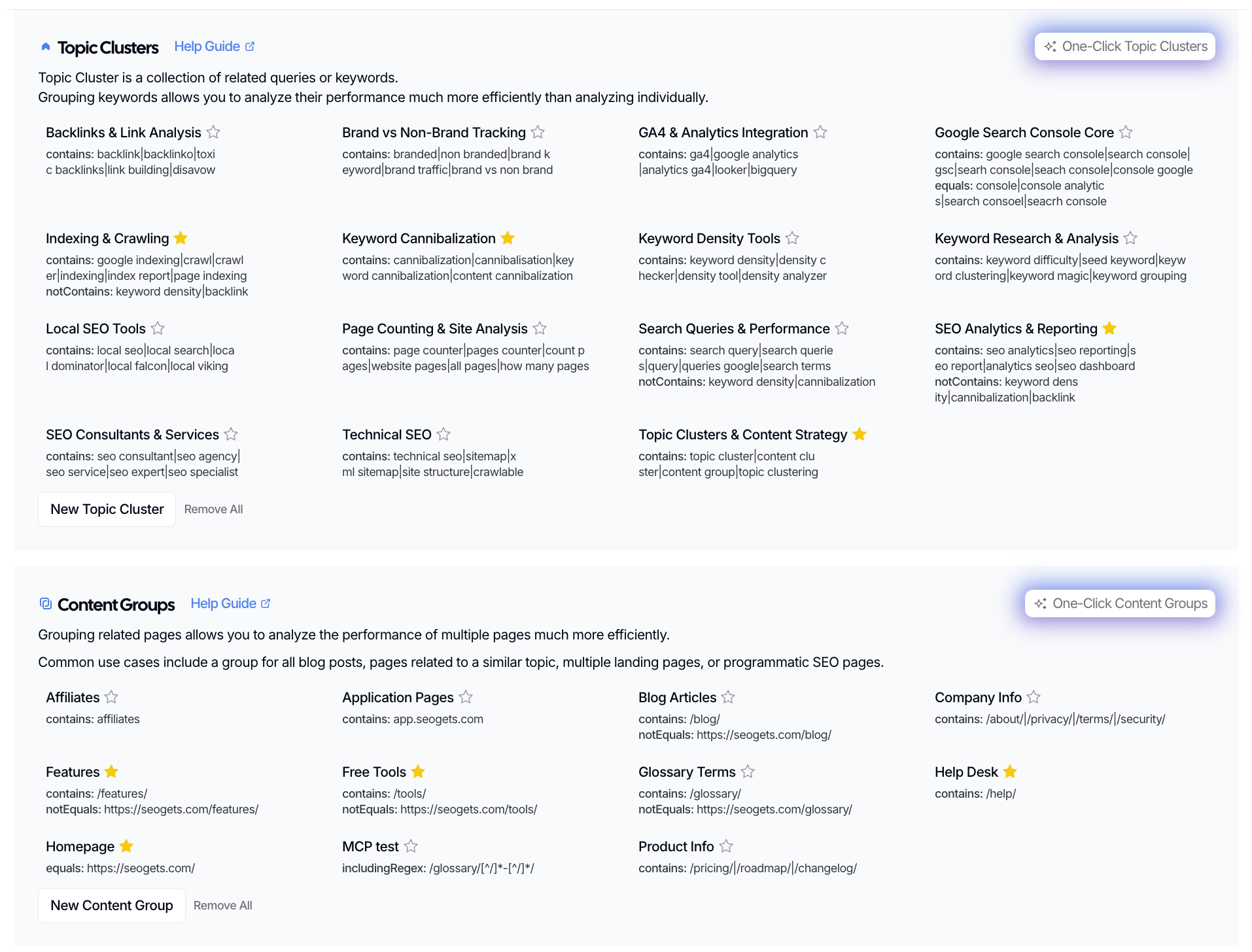
Want cleaner insights from SEO Gets? Start by grouping related content before you analyze performance. In SEO Gets, that usually means using Content Groups for related pages and Topic Clusters for related keywords. Once you’ve set them up, you can track performance in reports and with dashboard filters.
Use Content Groups when you want to track a section of your site, like blog posts, feature pages, or help docs. Use Topic Clusters when you want to track a theme made up of related keywords.
Choose the right way to group your content
The best setup depends on what you’re trying to measure.
Use Content Groups to track related URLs over time. This works well for blog categories, product pages, service pages, free tools, help center content, or any other section that shares a URL string pattern.
Use Topic Clusters to track related keywords over time. This is useful when you want to measure how a topic is growing, flattening, or declining across multiple queries and across multiple sections of your website.
If you’re not sure which one to use, ask yourself one question: are you grouping pages or keywords? Pages point to Content Groups. Keywords point to Topic Clusters.
Set up your content groups and topic clusters
Open Settings.
Choose Content Groups if you want to track related pages, or Topic Clusters if you want to track related keywords.
Create a new group or cluster.
Choose either a simple pattern or regex to define which URLs (or queries) belong in the group (or cluster).
Save your setup.
After you save it, the group or cluster becomes available in reports and dashboard filters.
If you want help with the full setup steps, see How to set up your first content groups and How to set up your first topic clusters.
Use one-click setup when it makes sense
SEO Gets also offers One-Click Content Groups and One-Click Topic Clusters for accounts with AI credits. This can be a faster way to get started if you don’t want to build everything manually.
If you already know exactly how you want to organize your pages or keywords, manual setup gives you more control.
Track performance after setup
Once your grouping is live, filter your dashboard or reports to focus on that specific Content Group or Topic Cluster. This helps you review performance without mixing unrelated pages and keywords together.
After filtering, SEO Gets can help you review:
Keywords tied to the group or cluster
Pages connected to the group
Countries to compare performance by market
Trend data to spot growth, decline, or flat performance over time
This is where grouping becomes useful. Instead of checking one URL at a time, you can look at the whole section or topic and see whether it’s moving in the right direction.
Mark your most important groups as priority
If a group or cluster matters more than the rest, mark it as priority. This makes it easier to keep your most important content in view during regular reviews.
A good rule is to mark groups as priority when they represent:
Your highest-value services or products
Content tied to revenue or leads
Key site sections you update regularly
Topics you’re actively trying to grow
Examples of useful content tracking setups
Here are a few practical ways to organize content in SEO Gets:
Blog category: Track how a set of blog posts performs over time.
Feature or product pages: Monitor a group of commercial pages together.
Help center content: Review support content as its own section.
Free tools: Measure how tool pages contribute to visibility.
Homepage: Keep your homepage separate to monitor branded search performance
These are especially helpful when you want to compare one content section against another or catch performance issues early.
What to look for in the trends
Once you’ve grouped your content, focus on patterns instead of isolated numbers.
If a content group's performance is improving, look for what changed and whether you can repeat it elsewhere.
If a content group is declining, check for pages that need updating, consolidation, or stronger internal support.
If multiple pages in the same content group compete for similar terms, you may have cannibalization.
If a topic cluster isn't gaining traction, review related pages and search for update and optimization opportunities.
This turns grouping into an ongoing review habit rather than a one-time setup.
What to do next
After you’ve grouped your content, the next step is deciding what action to take based on what you find. These guides can help: