
How 301 redirect tracking works
When you 301 a page, Google Search Console keeps reporting the old and new URLs as two separate pages. SEO Gets stitches them together, so the page you redirected to carries one continuous history and your dashboards show what actually happened.
Why 301 tracking matters
Search Console reports redirected pages as two separate URLs. The old page looks like it lost 100% of its traffic, the new page looks like it took off, and neither picture matches reality when combined performance is flat. That false signal makes it hard to tell what's actually growing or decaying.
301 tracking stitches the old and new URLs together. We precompute the combined data so the target page has one continuous history. Your charts, totals, and Growing/Decaying lists reflect what really happened, whether you're doing the analysis yourself or asking an AI.
Add your redirects
Add redirects in your 301 settings: enter the old page under From (old page), the page it now points to under To (new page), then click Add redirect. The parent is the key page, and everything reports under it.
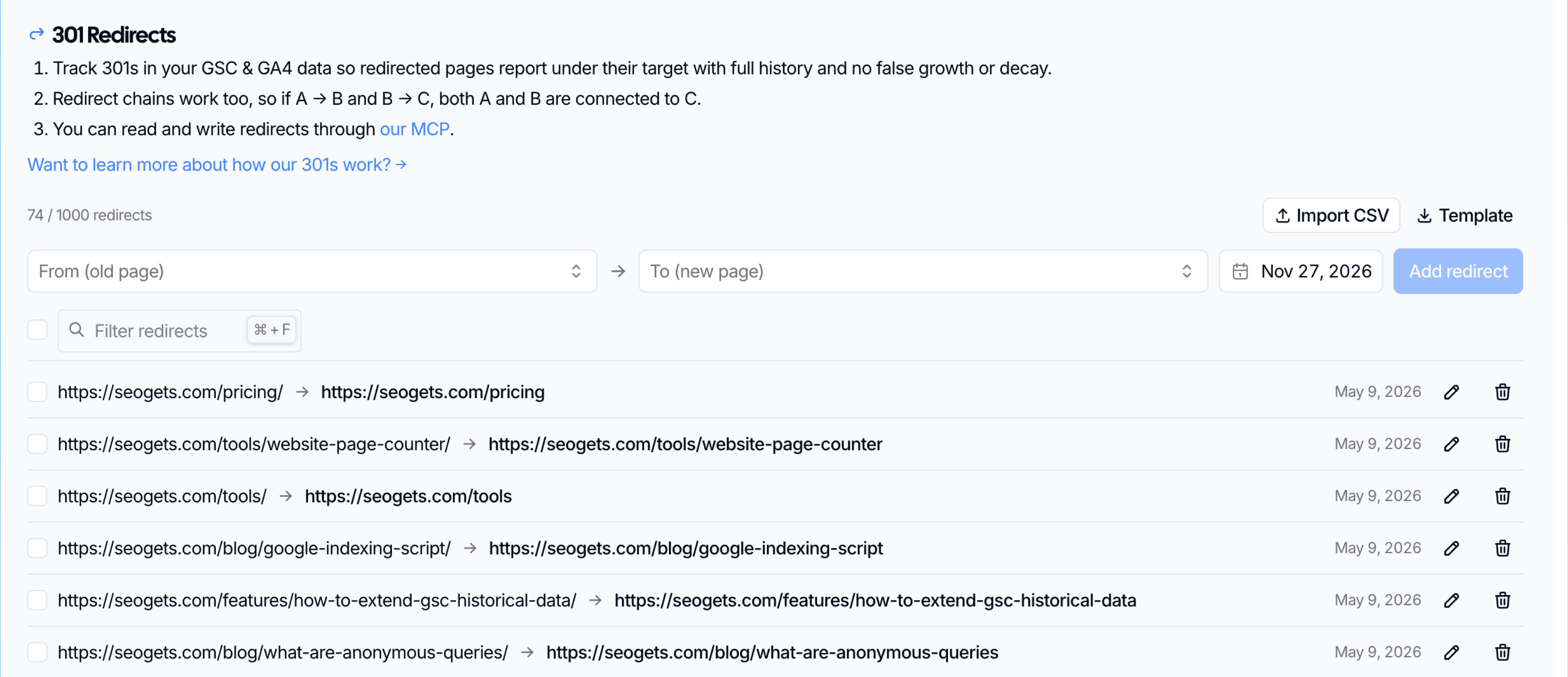
Your 301 settings page shows how many redirects your site is using against its plan limit, so you always know how much room you have left.
You can also list, add, and remove redirects through the SEO Gets MCP.
Redirect limits
How many redirects you can add depends on your plan:
Plan | Redirects |
|---|---|
Free sites | 5 |
Core sites | 250 |
SuperSites | 1,000 |
Need more than that? Reach out to customer support and tell us how many redirects you need, and we'll see what we can work out.
See redirected pages in your dashboards
Once a redirect is added, the parent page gets a dropdown arrow in your Pages tables. Expand it to see each child page, the date the redirect was added, and the clicks and impressions that child contributed.
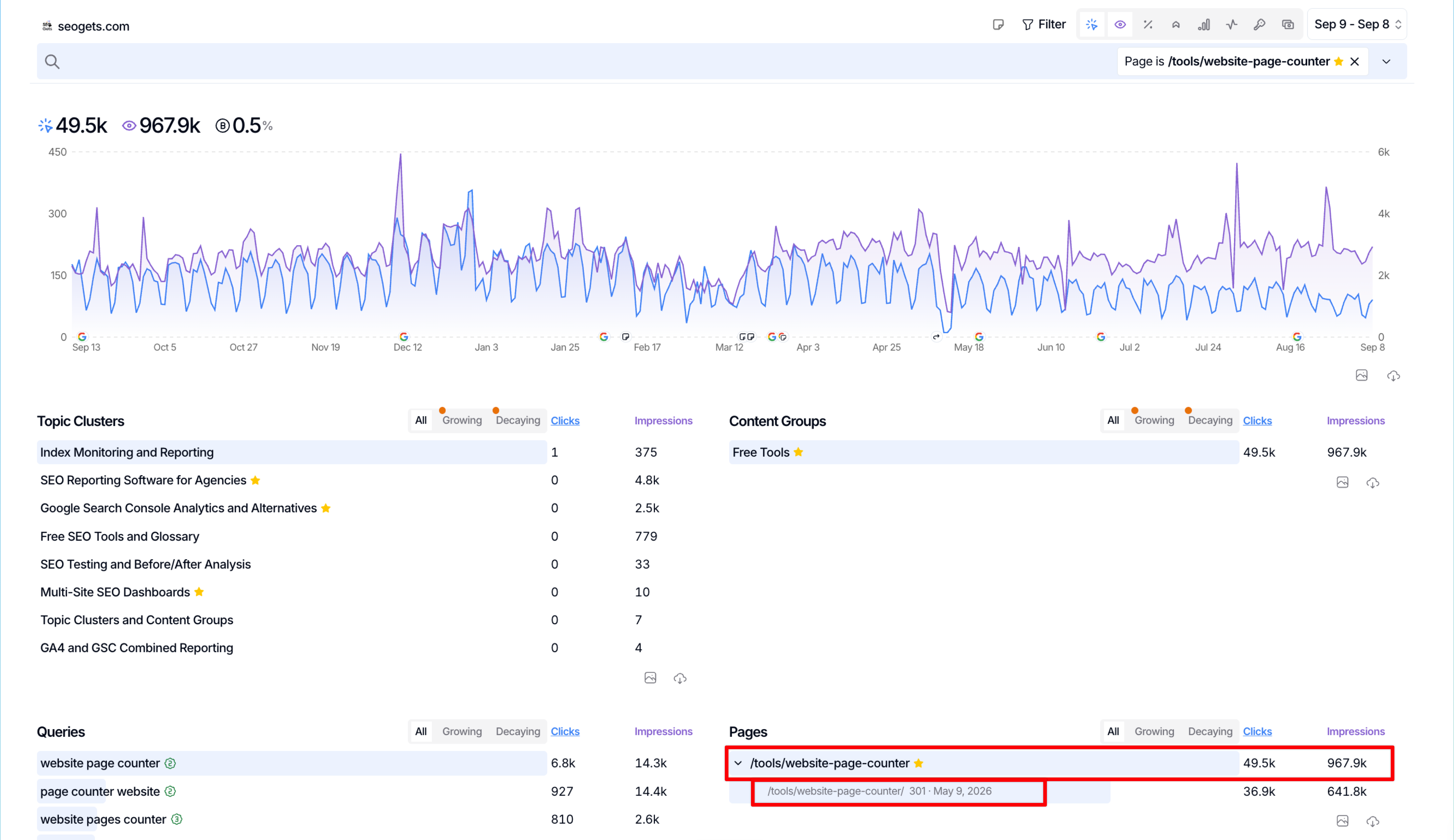
For example, /tools/website-page-counter/ redirects to /tools/website-page-counter. The /tools/website-page-counter row shows 49.5k clicks, and expanding it shows /tools/website-page-counter/ contributed 36.9k of them.
How the numbers add up
The parent's total always includes its child pages. If the parent shows 10 clicks and the child row in its dropdown shows 6, the parent URL earned the other 4 on its own during that time frame.
Row | Clicks |
|---|---|
Parent (shown total) | 10 |
Child (in the dropdown) | 6 |
Parent URL on its own | 4 |
A real example from seogets.com: /tools/website-page-counter shows 41.1k clicks over 12 months. Its child, /tools/website-page-counter/, contributed 26k of those, so the parent URL earned about 15.1k on its own.
Which time frames include a redirected page
A child page appears only when it has Search Console data in your selected date range or your comparison range. If neither range has data for the old URL, it won't appear in the dropdown and won't count toward the parent's totals.
For example, if the old URL stopped getting impressions in May and you're comparing the last 3 months to the 3 months before that, the child won't show.
Check when Google dropped the old URL
Click a child page to filter your dashboard to just that URL. The chart shows exactly when it stopped getting clicks and impressions in Search Console.
There's often a delay between adding the redirect and the old URL dropping out of Search Console. Filtering into the child is the quickest way to confirm Google has processed it. In one example, /tools/website-page-counter/ was redirected on May 9, 2026, and its traffic hit zero about a week later.
Redirect chains
Chains work too. If page A points to page B and page B points to page C, both A and B report under C, the final page in the chain.
Filtering and AI: no double counting
The parent page is always the key page. When you filter by the parent, or ask an AI about it through the SEO Gets MCP, its child pages are already folded into the numbers and aren't listed separately. Totals stay accurate when you add pages up.
To see a child page's own stats, filter or ask about the child directly, without targeting the parent.
What's next
Planning a cleanup? Start with Identify low-value pages to delete or 301 redirect
In the middle of a move? See Track site migrations in SEO Gets