
Find pages that need updates
Use SEO Gets to find pages that are losing traction, on the cusp of ranking higher, or competing with other pages on your site. Start with the SEO Gets content decay heatmap, then review striking distance keywords and keyword cannibalization. These tools live in the Optimize section of each SEO Gets property.
Step 1: Update decaying content
Updating decaying content is almost always faster ROI than publishing from scratch — the page already has backlinks, indexing history, and some level of authority that a brand new page has to earn. A refreshed page that once ranked well can recover quickly because Google already knows it exists, whereas new content can take months to gain any traction in competitive SERPs. Before you spend time and budget building something new, it's worth asking whether you're leaving traffic on the table from pages that just need a refresh to get back in the game.
Pages that are refreshed or add new content by at least 30% are proven to see above-average improvements to inbound traffic.
How it works
Click Optimize → Content Decay Map
Start by referencing the Decaying Pages That May Need Refreshing table at the top of the report. These are pre-selected refresh opportunities that show signs of decay.
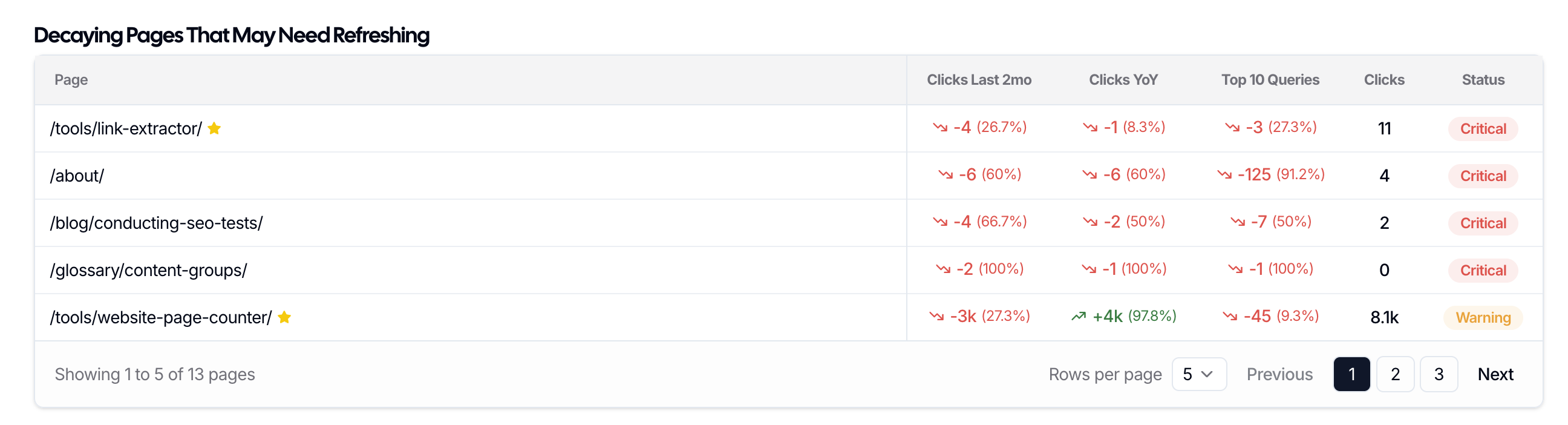
Use this table to instantly find decaying content accompanied by clear data that demonstrates the impact of decay as well as "warning" and "critical" statuses. Once you've addressed all of the relevant content in Decaying Pages That May Need Refreshing, you can use the content decay heatmap to discover other refresh opportunities.
Start by adjusting your date range and filters to dial in the report to your needs. You can glean valuable insights with the Top 10/20, People Also Ask, and Long Tail Keywords filters.
Then, select clicks or impressions to filter the table further. Most users default to clicks, but impressions can be helpful for gauging loss of awareness or even atrophying search trends (i.e., not many people search for "beepers" anymore).
Finally, set the threshold to where you can start to see a wide range of color shades. When you look across a URL's row, if you see the shade of blue lightening in color, you're seeing decay — you know what to do next!
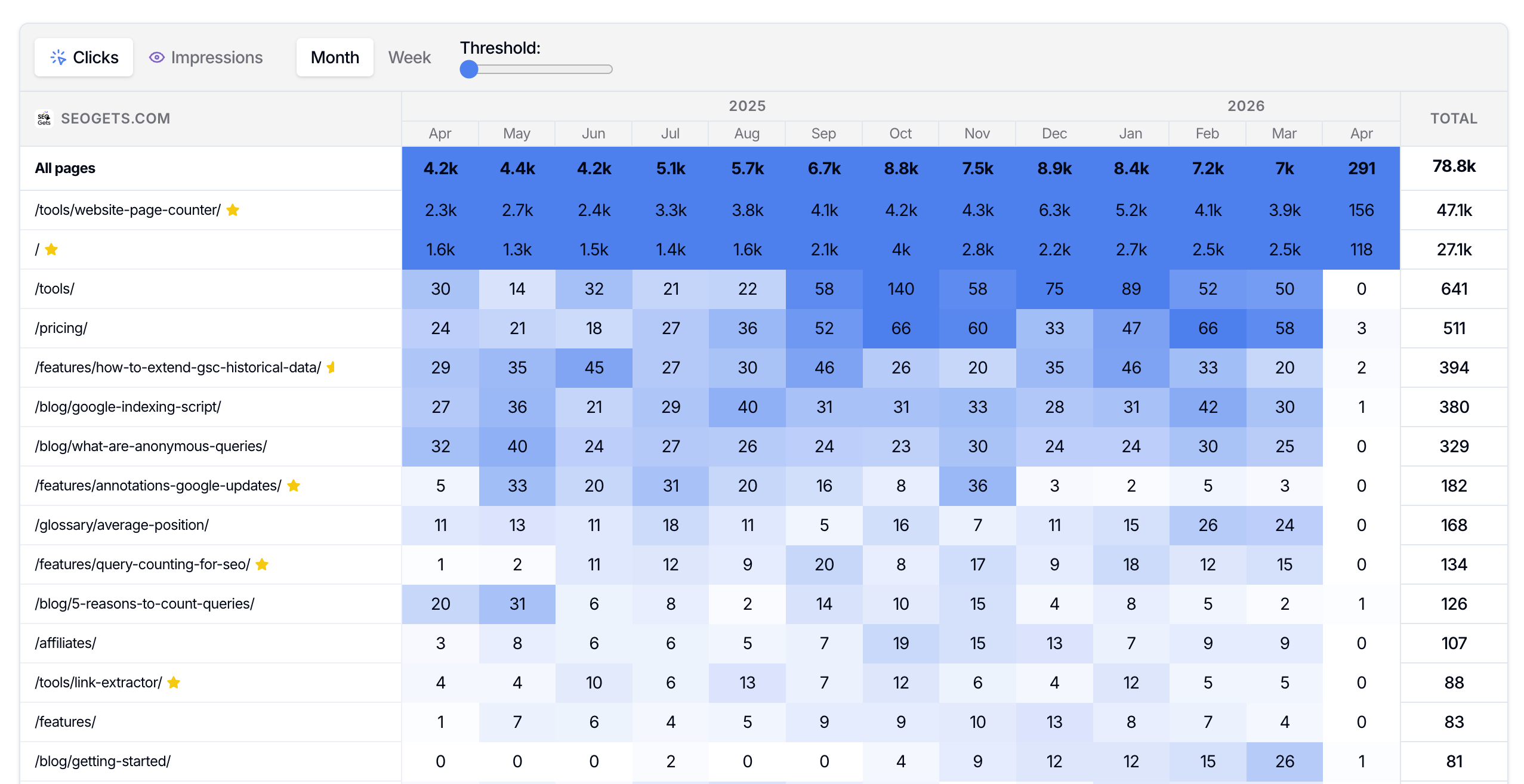
Context is important when auditing content decay. Your knowledge of your site's content, site maintenance, company preferences, and overall web strategy should be used as guardrails when choosing what content to refresh.
Step 2: Check striking distance keywords
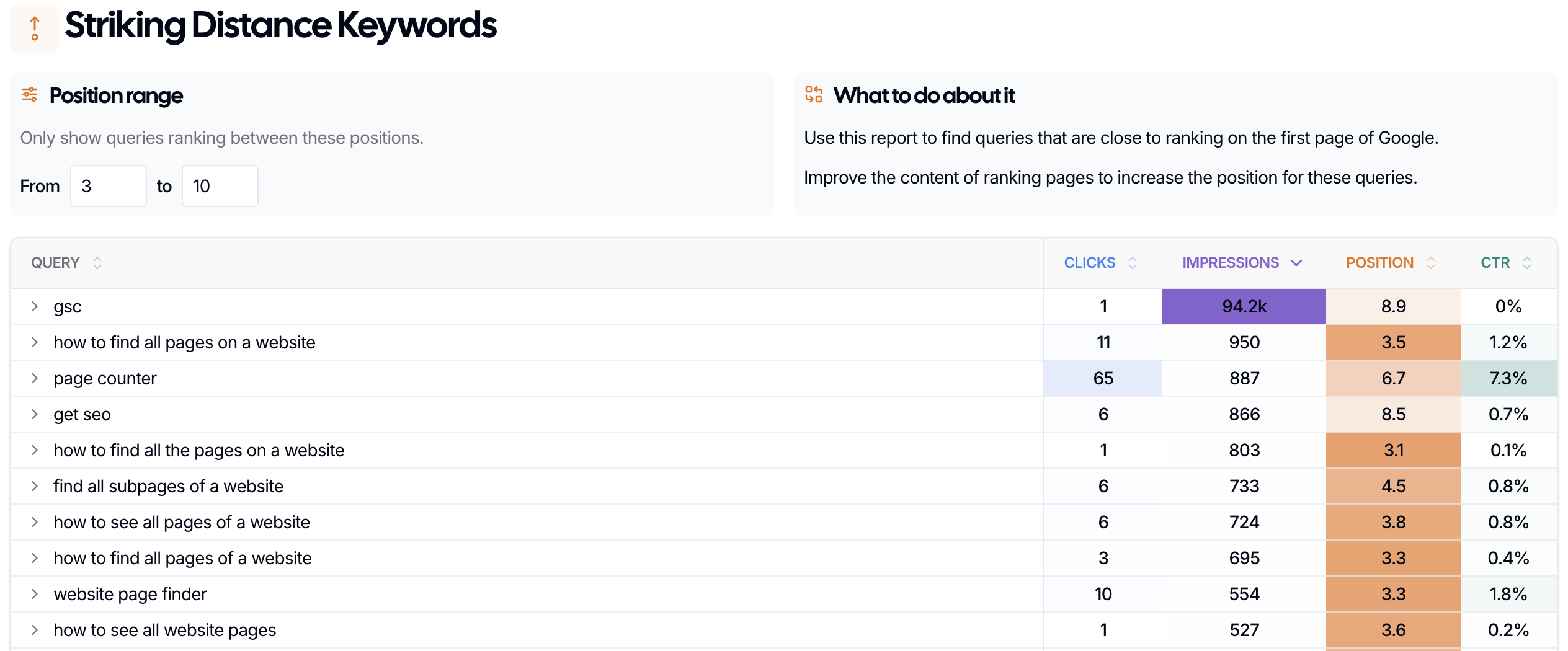
Next, look for queries where your content ranks close to page 1. These are your striking distance opportunities. When evaluating these keywords and the pages they're tied to, consider whether an update will get the job done or if you need to build new content to meet user intent and map your content to the SERP profile.
For example, if your homepage is ranking on page 2 for a keyword whose SERP is dominated by listicles, you may want to weigh the pros and cons of trying to force additional updates and optimizations to your homepage versus creating new content (remember, you can always evaluate any potential cannibalization in the SEO Gets keyword cannibalization tool).
How it works
Filter for keywords ranking just outside the top results (we default to positions 3-10, but you can expand the range to capture page 2 "on-the-cusp" opportunities).
Toggle the arrow next to the query to see which page is in striking distance.
Update the page to better match search intent, fill content gaps, and improve clarity.
This helps you focus on low-hanging-fruit opportunities can that can be addressed at scale via a well-planned content sprint.
Step 3: Resolve keyword cannibalization
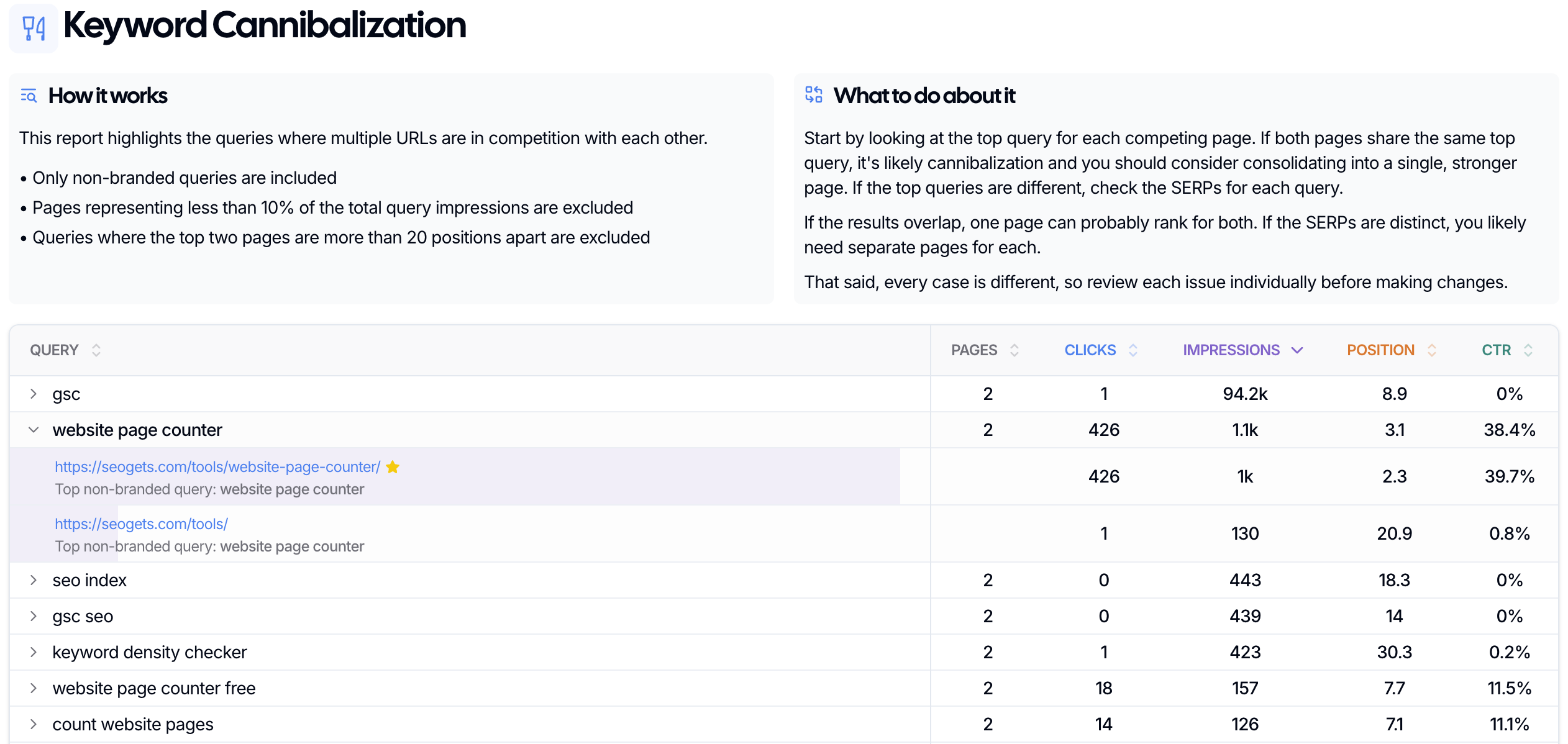
If more than one page is competing for the same query, performance can stall. Use keyword cannibalization reports to find that overlap and deploy content updates that widen the gap until keyword cannibalization is mitigated.
How it works
Select a query to see which URLs are competing.
Choose which page should be the main result.
Merge, redirect, or refocus overlapping pages when needed.
This is a useful way to spot pages that need improvement because the problem is often structure, not just the content itself.
To validate and fix true keyword cannibalization, make sure you're seeing significant overlap. The occasional click or impression probably isn't hurting your site. However, if you see positional jockeying, one page ranking where you want the other one to, or decreasing performance on a higher ranked page while performance on the lower ranked page increases, it's time to address your cannibalization issue.
How to decide what to update first
Above, we've laid out a practical plan for finding pages that need updating or improving, but your approach may differ based on your unique scenario. Here are some valid starting points to get you going:
Pages that lost traffic after performing well
Pages ranking just outside the top results
Pages targeting valuable queries with weak intent match
Pages competing with other pages on your site
If you're still no sure where to start or need assistance using any of these tools, contact customer success via the in-app chat for assistance.