
Regex in Google Search Console is one of those tools that separates the casual SEO from the power user. Once you learn a few patterns, you can slice and dice your search data in ways that basic filters just can’t touch.
We’ve just rolled out some major improvements to our filter presets in SEO Gets. You can now:
- Create presets at the individual property level OR at the user level – use the same regex across your master dashboard or any specific property
- Edit your filter presets – because sometimes you need to tweak things after the fact
Before we dive into the regex goldmine, a quick reminder: when filtering by query, you’re going to see anonymous queries disappear from your totals. Google hides queries that aren’t issued by more than a few dozen users over a two-to-three month period. Keep that in mind when analyzing your filtered data.
Also worth noting: SEO Gets supports easy multi-conditional filtering without needing regex at all. So if regex makes your head spin, you can still get powerful filtering with our saved preset filters.
Now let’s get into the good stuff.
General Regex (Works for Any Site)
These are your bread-and-butter patterns that work across any website type.
Question Queries
Find all the questions people are asking that lead to your site. Great for FAQ content and featured snippet opportunities.
^(who|what|where|when|why|how|can|does|is|are|should|could|will|did|do)This captures queries starting with common question words. Perfect for identifying People Also Ask opportunities.
Long-Tail Keywords (5+ Words)
Find those sweet, low-competition long-tail queries:
([^\s]*\s){5,}Replace the 4 with whatever minimum word count you want. 6 gives you 6+ word queries.
Branded vs Non-Branded
No need to do this because SEO Gets tracks these for you and builds reporting specifically on this. :)
Pro tip: Feed your homepage keywords to ChatGPT and ask it to generate common misspellings for your brand name.
Comparison/Commercial Intent Queries
Catch users in research mode:
(vs|versus|compare|comparison|alternative|alternatives|better|best|top|review|reviews)These searchers are close to making a decision. Great for creating comparison content.
Transactional Intent
Find queries with buying signals:
(buy|purchase|price|cost|cheap|discount|deal|coupon|order|shop|store|sale|affordable)Informational/How-To Queries
(guide|tutorial|how to|step by step|tips|tricks|ways to|best way to|learn|help|explain|examples|definition)Exclude Specific Keywords
Use “Doesn’t match regex” with this pattern to filter OUT certain terms:
(keyword1|keyword2|keyword3)Handy for removing irrelevant terms cluttering your data.
AI/LLM-Style Queries (Longer Queries)
ChatGPT-style searches tend to be longer. Find queries with 10+ words:
([^\s]*\s){9,}URL Directory Filtering (Page Filter)
Filter pages within specific directories:
/blog/|/guide/|/resources/Great for analyzing performance by content type.
SaaS Regex
These patterns are designed for software and B2B companies.
Software/Platform Intent
Find users looking for software solutions:
(?i)(software|platform|tool|app|system|application|solution|portal|suite|service)s?The (?i) makes it case-insensitive. The s? catches both singular and plural.
Problem-Solution Queries
Users searching for solutions to problems your software solves:
(problem\s*with|solution\s*for|how\s+can\s+i|template\s*for|automate|simplify)Pricing/Cost Queries
Catch bottom-funnel searchers looking at pricing:
(?i)(price|pricing|cost|costs|fee|fees|plans|subscription|free trial|demo|quote)Alternative Searches
Are people looking for alternatives to your competitors (or you)?
(alternative to|alternatives to|instead of|competitor|vs|versus|compared to|switch from)Integration Queries
Find users looking for integrations:
(integration|integrate|connect|sync|api|webhook|zapier|plugin)Feature-Specific Queries
Looking for users searching for specific feature types:
(dashboard|analytics|reporting|automation|workflow|collaboration|tracking)Customize with your actual feature names.
Local SEO Regex
For businesses serving specific geographic areas.
”Near Me” Queries
(?i)\bnear me\bLocal Intent Signals
(near me|in\s|at\s|locations?|directory|area|local|closest|nearest)City/State Queries
Replace with your target cities:
(?i)(new york|los angeles|chicago|houston|phoenix|dallas|san diego)Or for states:
(?i)(california|texas|florida|new york|illinois|pennsylvania|ohio)Service + Location Queries
Find queries combining your service with locations:
(plumber|dentist|lawyer|restaurant|salon).*\b(in|near)\bReplace the service terms with your offerings.
Local Transactional Intent
Questions with local buying signals:
^(who|what|where|how|can|should).*\b(best|hire|cost|price|reviews)\b.*\b(city1|city2|neighborhood1)\bHours/Availability Queries
(hours|open|closed|schedule|appointment|booking|available|availability)eCommerce Regex
Patterns built for online stores.
Product Type Queries
(shoes|sneakers|boots|sandals|heels)Swap in your product categories.
Shopping Intent
(?i)(buy|shop|order|purchase|add to cart|checkout|shipping|delivery|returns)Product Reviews/Ratings
(review|reviews|rating|ratings|best|top|worst|recommended)Price-Sensitive Queries
(?i)(cheap|affordable|budget|discount|sale|clearance|deal|under \$|less than)Size/Color/Variant Queries
(size|small|medium|large|xl|xxl|color|red|blue|black|white|mens|womens|kids)Product Comparison
(vs|versus|compare|or|better|difference between).*\b(product1|product2)\bBrand + Product Queries
(?i)(nike|adidas|apple|samsung).*\b(shoes|phone|watch|laptop)\bReplace with your brands and product types.
Best/Top Listicle Queries
Catch users looking for recommendation content:
\b(best|top-rated|trusted|famous|top|most|perfect)\bTrust Signals (Reviews/Legitimacy)
(review|reviews|reddit|rating|scam|legit|trustworthy|experience|complaints)Bonus: PAA (People Also Ask) in Different Languages
If you’re targeting international markets, here are question-word patterns for different languages:
Spanish:
^(qué|cómo|cuándo|dónde|por qué|quién|cuál|cuánto)French:
^(quoi|comment|quand|où|pourquoi|qui|quel|combien)German:
^(was|wie|wann|wo|warum|wer|welche|wieviel)Portuguese:
^(o que|como|quando|onde|por que|quem|qual|quanto)Italian:
^(cosa|come|quando|dove|perché|chi|quale|quanto)How to Use These in SEO Gets
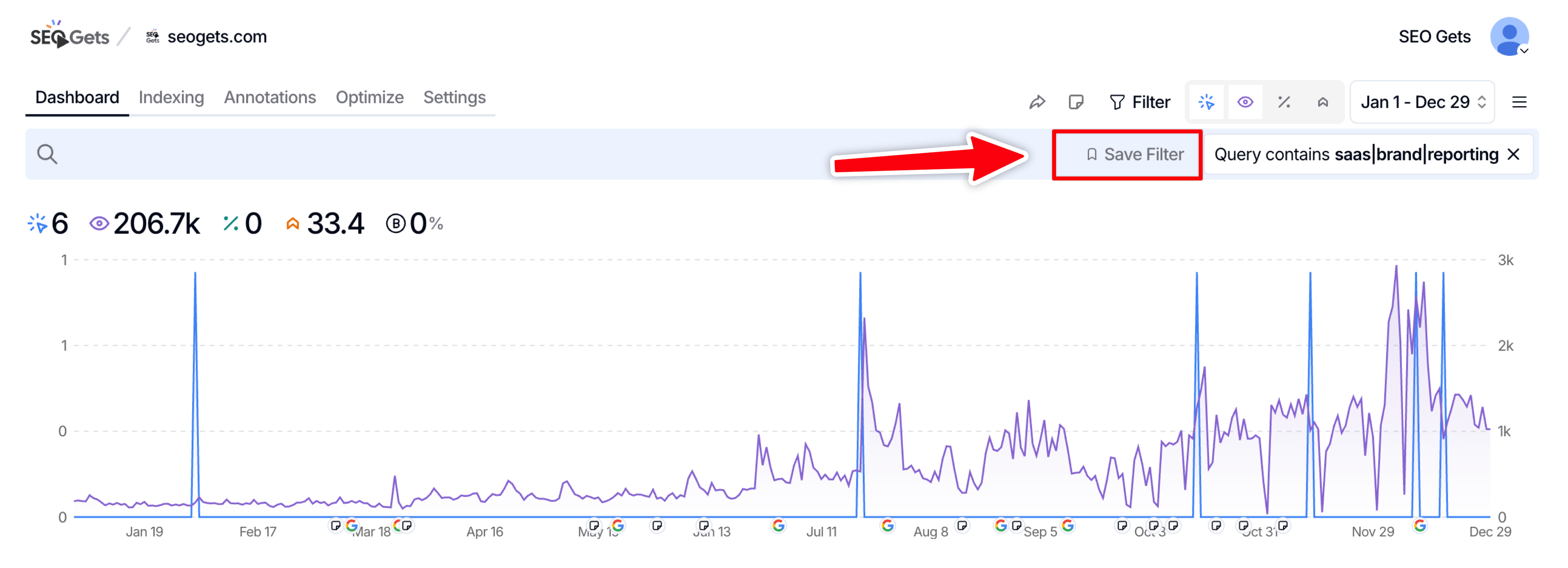
- Go to your SEO Gets dashboard
- Click on any property (or stay on master dashboard for cross-property filtering)
- Click the filter dropdown and select “regex”
- Paste your pattern
- Save as preset to reuse later
Remember: you can now create presets at the user level (works everywhere) or property level (specific to that site).
Quick Tips
- Case sensitivity – GSC regex is case-sensitive by default. Add
(?i)at the start to make it case-insensitive - Start simple – You don’t need complex patterns. Even
buy|purchase|orderis powerful - Combine with page filters – Use a query regex AND a page filter together for laser-focused analysis
Wrapping Up
Regex in GSC (and SEO Gets) is genuinely one of those skills that keeps paying dividends. Once you build up a library of useful patterns, you can diagnose issues and find opportunities in seconds that would take hours of manual filtering.
Save your favorites as presets in SEO Gets and you’ll never have to remember the syntax again.
If I’m missing any good ones, email me at matt@seogets.com and I’ll add them with a mention. :)
Until next time, Matt
✨ Want to simplify your SEO analytics workflow? Try SEO Gets for free.
✨ Interested in simplifying your SEO analytics workflow? Try SEO Gets for free.