5 Reasons to Use Query Counting for SEO Growth
Hey! Matthew here, co-founder of SEO Gets. Today, I want to share a metric that’s changed how I analyze website performance: query counting.
Key Takeaways
- Measure Topical Authority: Query counting reveals if you are gaining visibility even when seasonal traffic dips.
- Diagnose Performance: Use query vs. click patterns to identify intent mismatches or technical issues like lost sitelinks.
- Validate Content Changes: Confirm that merging or pruning pages hasn’t accidentally removed unique ranking keywords.
- Track Local Growth: Monitor geographic expansion by watching for new location-based query arrivals.
- Focus on Quality: Prioritize query growth in positions 1-3 to drive actual traffic and conversions.
I’ll walk through 5 ways I use query counting to find actionable insights and grow organic traffic.
- Measuring topical coverage and expansion
- Finding answers to performance inconsistencies.
- Validating cannibalization fixes.
- Tracking local SEO expansion.
- Understanding the quality of your query growth.
1. Measure content visibility & topical coverage
Query counting gives you a clear way to measure your site’s topical coverage and content visibility.
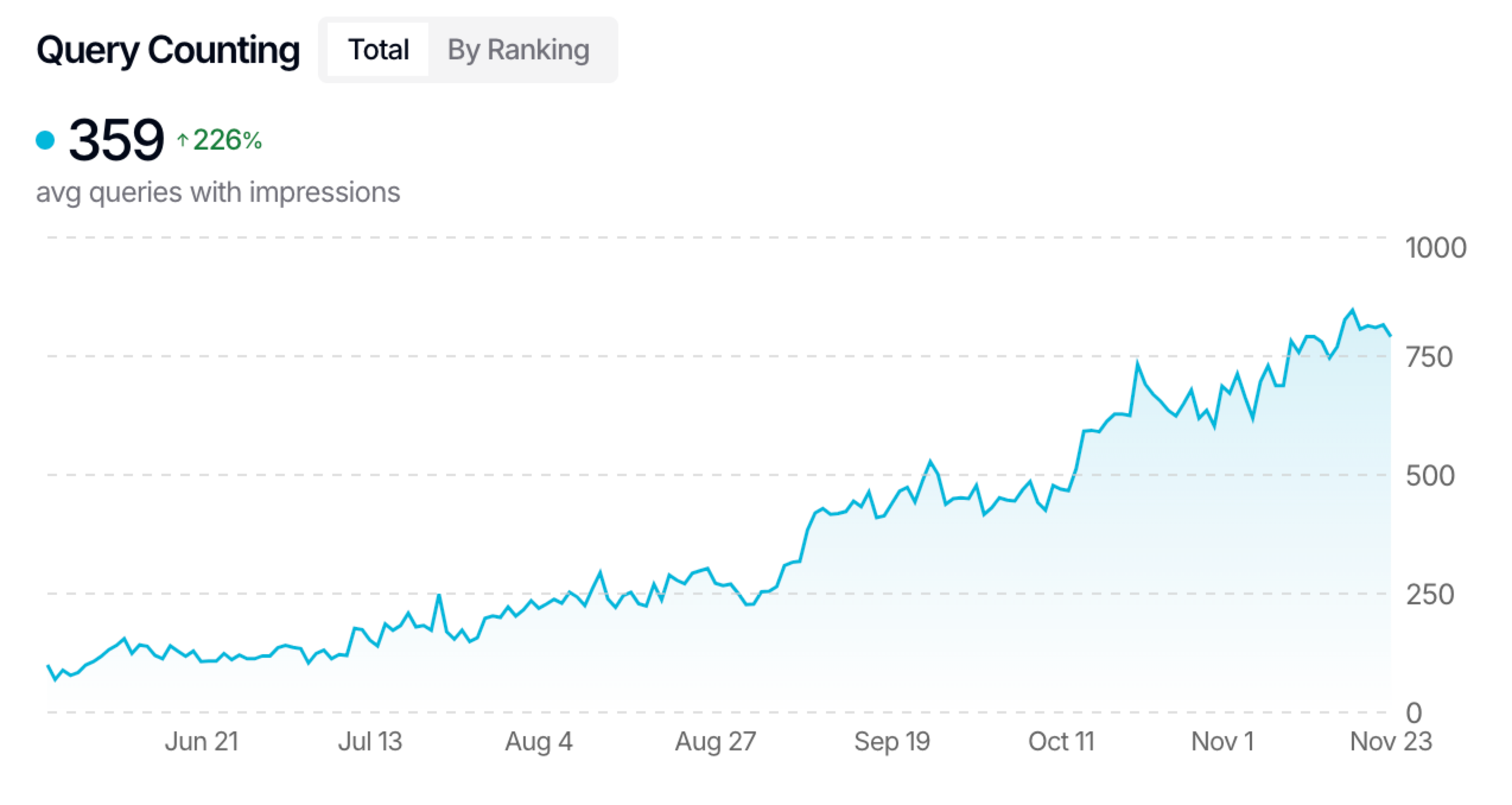
I recently analyzed a site that quadrupled its query count from August to November while maintaining relatively stable traffic levels. During the same period, impressions actually decreased slightly.
What story does this tell us?
The site was expanding its topical authority (more queries) even as seasonal demand for those topics declined (fewer impressions). Without query counting, you might incorrectly assume your SEO efforts weren’t working when in fact, you were building a stronger foundation.
2. Performance troubleshooting made clear
Query counting gets more useful when you look at it alongside traditional metrics. Here are a few patterns I regularly see and what they actually mean:
| Query Trend | Click Trend | Meaning & Action |
|---|---|---|
| Increasing (↑) | Increasing (↑) | Success: Expanding reach and delivering high-quality content. |
| Increasing (↑) | Decreasing (↓) | Warning: Ranking for more terms but average position dropped. Improve content quality. |
| Stable (→) | Increasing (↑) | Optimization: Better rankings for existing queries or increased demand/branded growth. |
Let me share a real example: A client completed a site migration, and while their query count remained stable, their clicks dropped significantly. After investigating, we discovered they had lost their sitelinks in branded search results during the domain transfer. The diagnosis would have been nearly impossible without query counting data.
3. Validate content pruning & keyword cannibalization fixes
Ben Goody wrote a detailed post about keyword cannibalization that’s worth checking out. When you remove or merge pages to fix cannibalization issues, query counting becomes your validation tool.
Here’s why it works:
- If you remove a page and your query count drops significantly, you’ve likely made a mistake – that content was bringing in unique queries
- If query count remains stable after removal, you’ve successfully consolidated without losing visibility
We’ve built a keyword cannibalization tool in SEO Gets to make identifying these opportunities simple, but you can also find them manually in Search Console.
4. Track local SEO expansion
For local businesses, query counting is invaluable for tracking geographic expansion.
While seasonal fluctuations and ranking improvements can explain increases in clicks and impressions, growing your query count typically means you’re appearing for new location-based searches (like “service in city”).
I regularly use query counting to validate that my local SEO clients are expanding their visibility across service areas, not just improving rankings for existing locations.
5. Take it further with query quality analysis
Beyond the raw numbers, examine the quality of your queries by breaking them down by ranking position:
- Position 1-3: These drive the most traffic
- Position 4-10: First page but less valuable
- Position 11-20: Second page, minimal traffic
- Position 21+: Virtually invisible
I prioritize growth in positions 1-3, as gaining hundreds of position 21+ rankings rarely moves the needle for traffic or conversions.
How to track query counting (even without SEO Gets)
While SEO Gets provides this data automatically (and allows for up to 50,000 queries versus Search Console’s 1,000 row limit), you can track this metric manually:
- Go to Google Search Console’s Performance report
- Note the total number of rows (queries) for a specific date range
- Record this number in a spreadsheet alongside the date
- Repeat weekly (daily would be too time-consuming)
- Create a simple line graph showing the trend using Chat GPT.
For larger sites that exceed the 1,000 query limit in Search Console, you’ll get incomplete data. Even for smaller sites, manually tracking this weekly is tedious and error-prone – that’s why we built this directly into SEO Gets.
What’s next?
If you’re using query counting in interesting ways or have found other applications, I’d be interested in hearing about them. You can reach me at [email].
Until next time!
Matt
P.S. Manually tracking query counts is tedious and limited by Search Console’s 1,000-row cap. SEO Gets tracks this automatically with full data access, and it’s free for sites under 1,000 clicks per month.
✨ Interested in simplifying your SEO analytics workflow? Try SEO Gets for free.
Frequently asked questions
What is query counting?
Query counting is the process of tracking how many unique search terms show your pages in Google results. A higher count means your content is visible for more topics, signaling stronger topical authority.
What’s the difference between a “query” and a “keyword”?
A query is the exact phrase a user enters into Google, such as “best running shoes size 8.” A keyword is the term you decide to target in your SEO strategy, like “running shoes.” Query counting measures real queries—what people actually search for—not just your planned keywords.
Why can my query count rise while clicks fall?
If your query count grows but clicks drop, you’re likely ranking for more terms yet appearing lower on the page. Users see you, but fewer click. Check your average positions and improve content so it answers those new queries better.
How often should I review my query count?
Check it once a week to spot trends early without getting lost in daily noise. Weekly data shows meaningful movement, while monthly reviews risk missing sudden swings.
How is query counting different from tracking clicks or impressions?
Clicks tell you how many visitors you earned. Impressions show how often you appeared. Query counting shows how wide your reach is by tracking the number of different search terms you show up for. Use all three metrics together for a full performance picture.
✨ Interested in simplifying your SEO analytics workflow? Try SEO Gets for free.