
First prompt: "Show me pages that lost traffic in the last 30 days."
Follow-up: "Which of those are blog posts?"
Refine further: "Focus on blog posts that dropped by more than 50%."
Once you've connected SEO Gets to Claude Desktop using the MCP server, you can ask Claude natural-language questions about your search performance data. No more digging through dashboards or exporting spreadsheets—just ask and get answers.
If you haven't connected yet, start with our guide on how to configure SEO Gets MCP in Claude Desktop.
When chatting with Claude about your SEO Gets properties, be sure state the exact property you want to query.
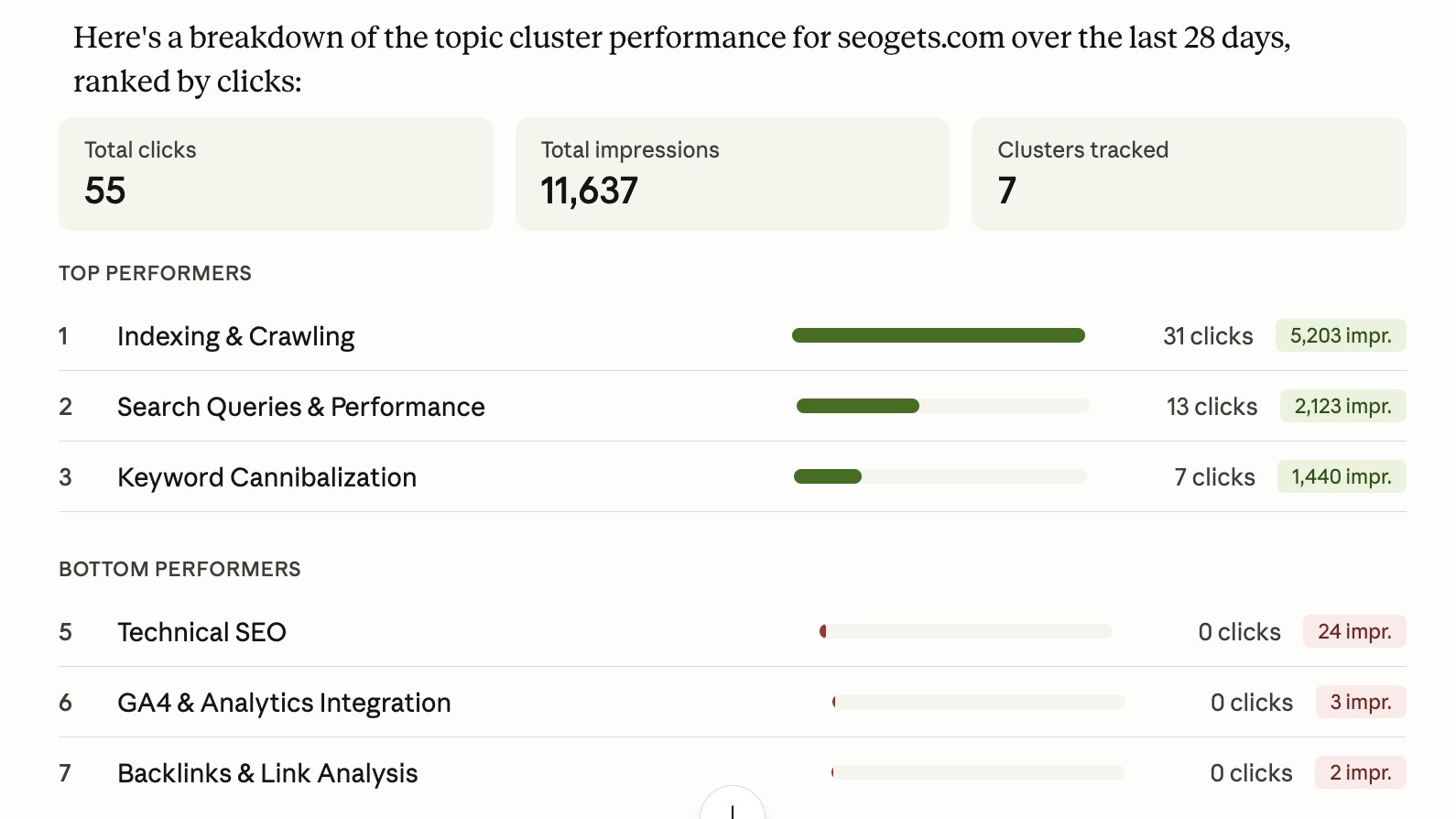
The SEO Gets MCP is a powerful tool for analyzing and contextualizing your GSC data. It builds on the features and capabilities of the platform, enabling you to analyze topic clusters, content groups, branded, non-branded keywords, and more to build high-impact action plans in minutes.
To get started, try asking Claude questions like these:
What are the top/bottom performing topic clusters for [site name]?
Which topic cluster/content group should I focus on next for [site name]?
For [site name], should I prioritize content decay or striking distance keywords?
Give me a summary of indexing in the last 30 days for [site name]
Which pages on [site name] should I acquire backlinks for?
Which blog pages on [site name] should I remove or consolidate?
What MCP can't answer: Image search queries, Discover/News/Video breakdowns, and GA4-specific metrics aren't available through MCP. For those insights, open the SEO Gets dashboard and use the search type filters directly.
Start broad to understand what's happening across your sites, then drill down into specifics:
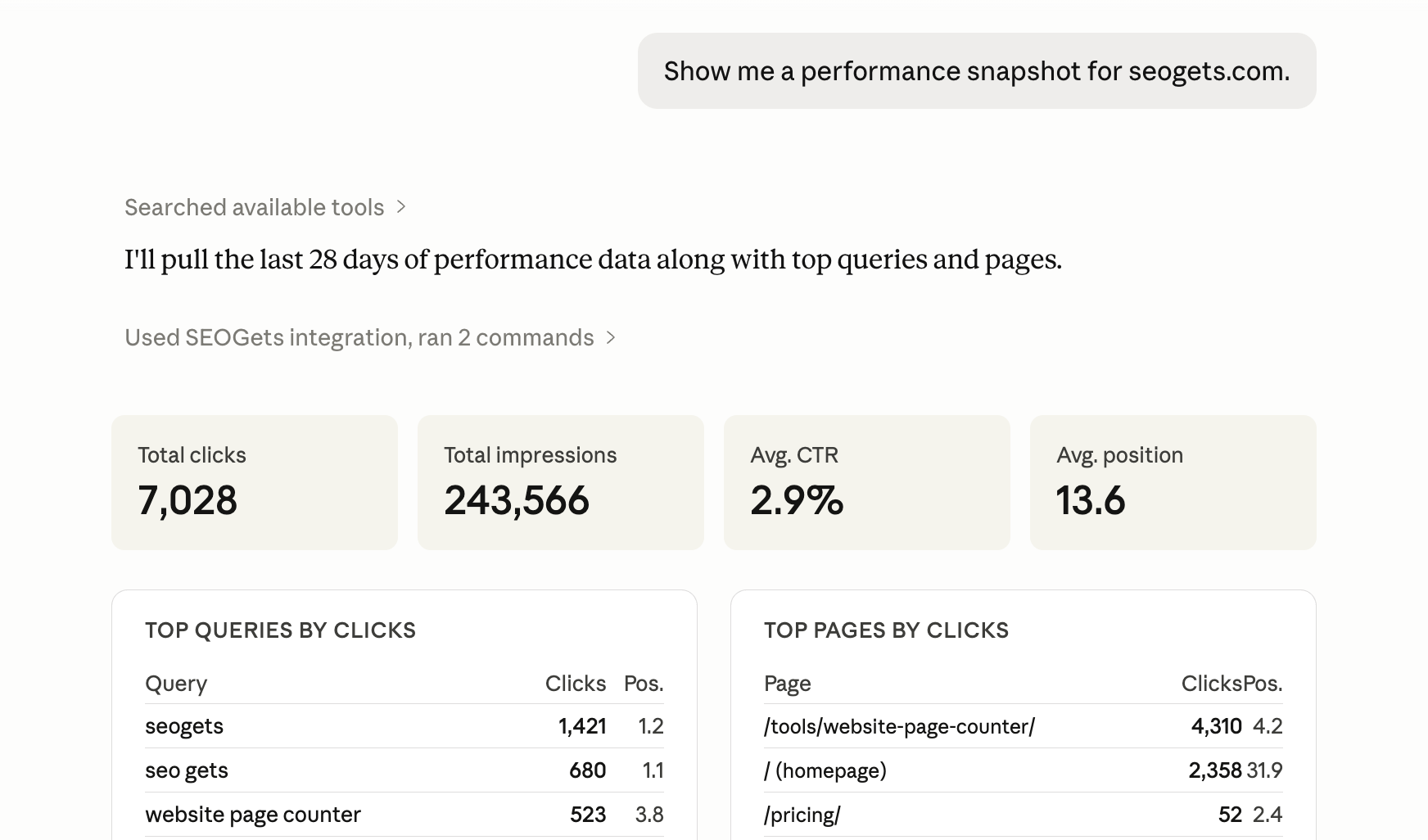
"Show me a performance snapshot for [site name]."
"Which of my sites had the biggest traffic changes this month?"
"Compare performance across all my sites for the last 30 days."
Check how Google is crawling and indexing your pages:
"What's my current indexing status for [site name]?"
"Show me the indexing overview—how many pages are indexed vs. not indexed?"
"Which URLs might have indexing issues?"
Dig into your Google Search Console performance data:
"What are my top-performing pages this month?"
"Which pages lost the most traffic recently?"
"Show me queries with high impressions but low CTR—I want to optimize my titles."
Find gaps and opportunities in your content:
"Which pages should I prioritize for content updates?"
"Show me pages that are slowly declining in traffic."
"What topics should I create new content for based on query data?"
If you're managing multiple properties (great for agencies or consultants), try these:
"Which of my sites need my attention today?"
"Which site has the most pages with indexing issues?"
"Compare [Site A] vs. [Site B] performance over the last quarter."
Claude works best when you start broad and then refine. Here's how to get more specific answers:
First prompt: "Show me pages that lost traffic in the last 30 days."
Follow-up: "Which of those are blog posts?"
Refine further: "Focus on blog posts that dropped by more than 50%."
This pattern works for any analysis—start with the overview, then layer in filters by content type, traffic threshold, date range, or specific URLs.
Be specific with site names: Claude can pull data for any site you've connected, but you'll get faster answers if you specify which one you're asking about.
Use natural language: No need for perfect phrasing. "What pages are doing poorly?" works just as well as "Show me pages with declining traffic."
Ask for explanations: If you're not sure what a metric means, ask Claude to explain it in context. "Why might my CTR be dropping for these pages?"
Combine with other tools: Claude can pull from SEO Gets alongside other data sources you've connected, so you can ask comparative questions.
The more you use MCP, the better it gets at understanding your sites and your priorities. Treat it like a conversation—start with what you're curious about, then follow the thread.