
Compare year-over-year performance in SEO Gets
SEO Gets supports year-over-year comparison right out of the box. When paired with the extended storage capabilities of a Super Site, SEO Gets users can perform full year-over-year comparisons spanning more than the 16 months users are capped at in GSC.
How to turn on Year Over Year comparison
Click the date range dropdown at the top of your dashboard.
Look for the Comparison Period section.
Select Year Over Year from the comparison options.
That's it. Your dashboard will now show both your selected date range and the same period from the previous year, so you can compare performance side by side.
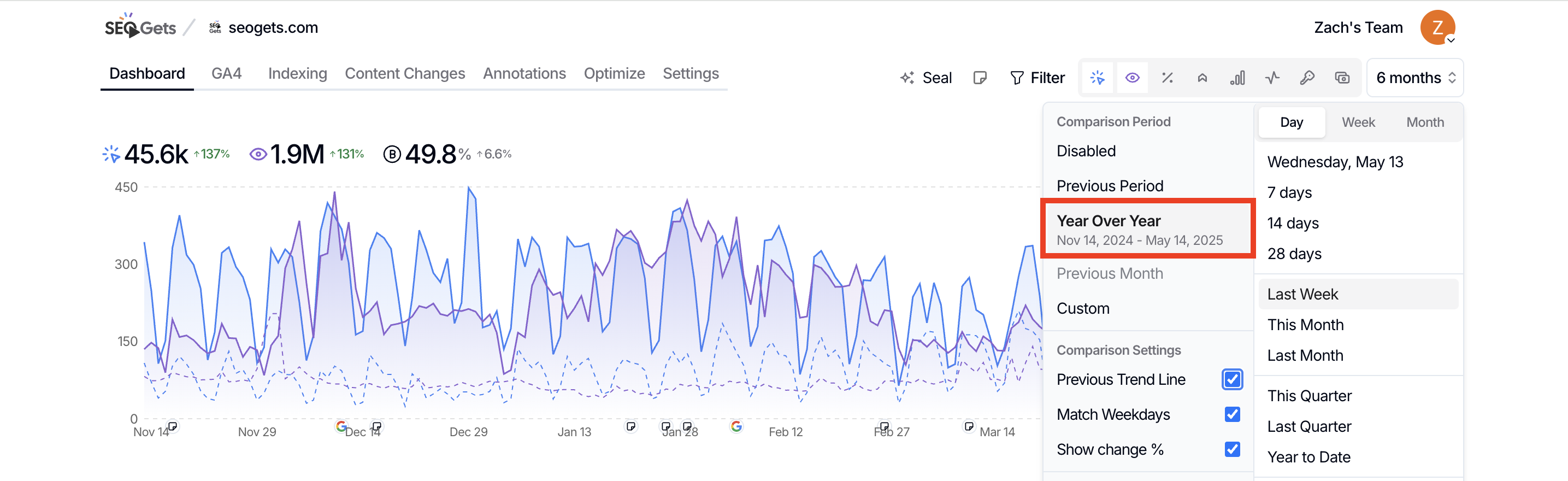
What you'll see with YoY enabled
Charts display both the current period and the comparison period, making it easy to spot growth or decline at a glance.
Metrics include clicks, impressions, CTR, and position for GSC data, plus sessions, engagement rate, key events, and revenue for GA4 data (if connected).
Comparison settings let you fine-tune the view with options like Show change %, Match Weekdays, and Previous Trend Line.
Enable Show change % in the comparison settings to see percentage differences automatically calculated between the two periods.
Other comparison modes available
Year-over-year is just one option. The comparison selector also includes:
Previous Period — Compare against the immediately preceding period
Previous Month — Compare against the prior calendar month
Custom — Choose any two date ranges to compare
One important note: historical data
For true year-over-year analysis, you need enough historical data to compare against. Google Search Console only retains 16 months of data, which can limit how far back you can go.
If you need deeper history—up to 5 years—consider enabling Super Sites for extended data storage. This unlocks true multi-year comparisons for long-term SEO strategy.
Super Sites store up to 5 years of historical data, giving you a much longer window for year-over-year and multi-year trend analysis.
Go deeper with YoY analysis
For a full walkthrough of how to approach year-over-year SEO analysis—including what to look for, how to segment your data, and when YoY is most useful—see Year-over-year SEO analysis with Google Search Console data.